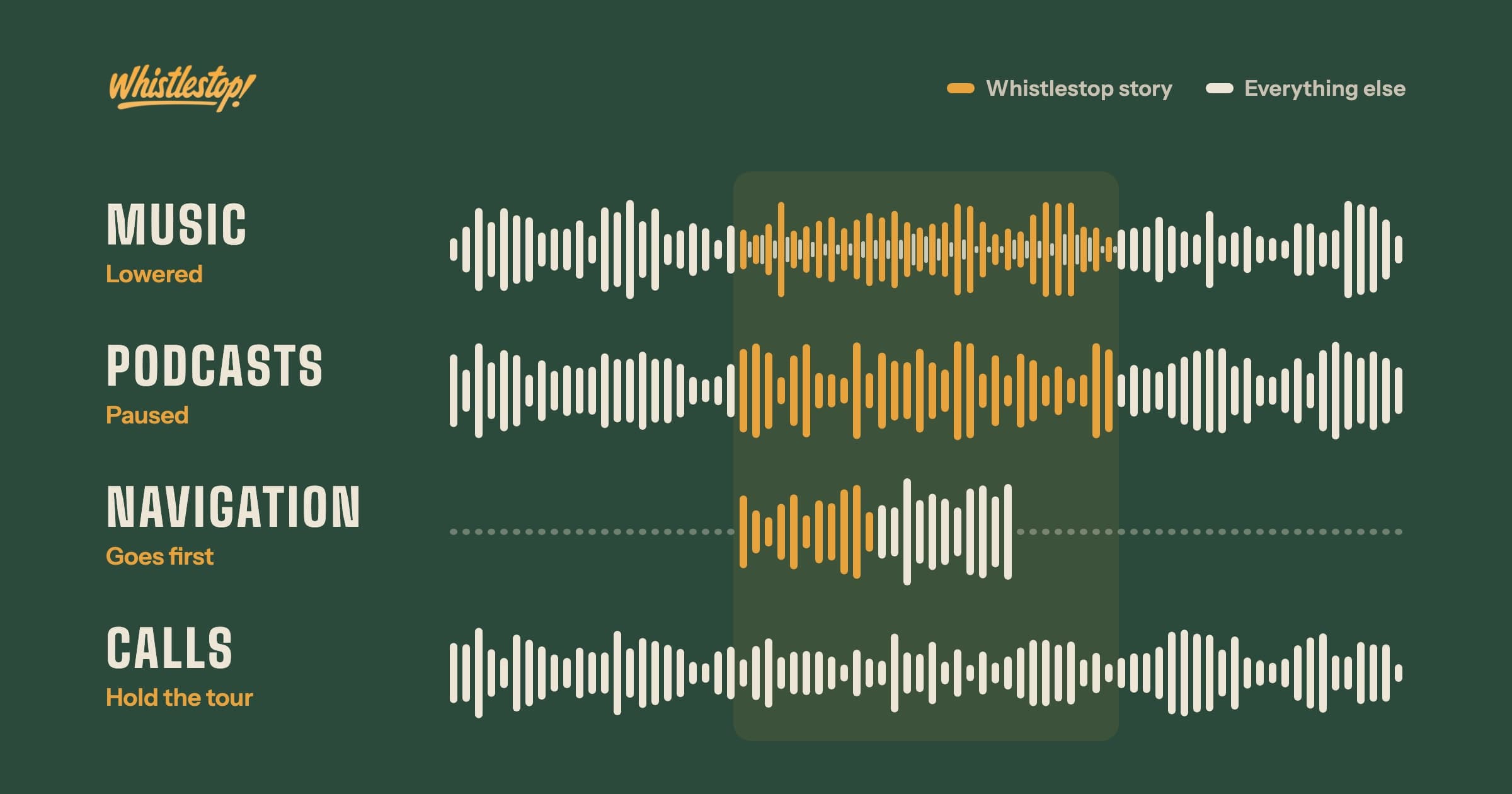
Whistlestop lowers music, pauses podcasts and audiobooks, gives way to navigation, and goes quiet for phone calls. Here is why each works that way.
Whistlestop is made to run in the background on a drive. Nobody has to touch it. When the car gets close to a place worth knowing about, it speaks up, tells a short story about it, usually around 30 seconds, and then goes quiet until the next one.
Before the app was released, a group of testers drove with it and told us what was working and what wasn't. One of the first things I noticed on my own test drives was that Whistlestop is almost never the only thing playing in the car. There is music, or a podcast, or Google Maps giving directions, or a phone call. It became clear on the road that each of those needed to be handled a different way.
Music gets quieter
When a story starts over music, the music doesn't stop. Its volume drops, the story plays over it, and the music comes back up to full volume when the story ends. This is called ducking. The song keeps playing the whole time, so nothing gets skipped.
I like how this sounds in the car. The music carries on under the story like a soundtrack for it. The narration voice also gets a 4 decibel boost so it stays clear of the music underneath.
Podcasts and audiobooks pause
I listen to podcasts and audiobooks on long drives too, and lowering them didn't work. With a podcast ducked under a story, two people are talking at once, and the quieter one is still there, mumbling in the background. It's distracting. And whatever the podcast said during those 30 seconds is missed.
So Whistlestop pauses spoken audio instead of lowering it. The podcast or audiobook stops where it is, the story plays, and a second or two after the story ends, it picks back up from the same spot.
The phone does the sorting. Apps that play spoken word tell iOS that's what they are, and iOS pauses them for Whistlestop rather than turning them down.
Navigation comes first
On a road trip, or even a drive across town, I usually have Google Maps running. After a few drives with the beta, it was obvious that a turn instruction matters more than any story. Missing an exit because Whistlestop was talking about a courthouse would be a bad trade.
So navigation always wins. When Google Maps or Apple Maps speaks a direction, the Whistlestop story stops completely. It doesn't wait out the direction and pick back up. The app goes back to watching the road ahead and speaks again when the next story is ready.
Phone calls hold the tour
While testing, I would sometimes be on a call, outgoing or incoming, and Whistlestop would find a place and start telling a story right over the conversation. That one got fixed quickly.
Whistlestop now goes quiet the moment a call starts and stays quiet until it ends. An incoming call counts from the first ring, and an outgoing call counts from the moment it's dialed. FaceTime calls count too. If a story is playing when the phone rings, it stops.
The tour keeps running in the background during the call, following the drive. After the call ends, it waits at least five seconds before starting another story, so the next one doesn't land on top of a goodbye. Any story that was cut off by a call stays on the map as a dot, and a passenger can tap it to hear the whole thing later.
What decides the order
Each of these comes from the same question: how important is it to hear this right now? A turn instruction or a phone call matters more than a story about a place, so those always go first. A podcast or an audiobook is something the driver is following from start to finish, so it waits for the story to end instead of being talked over. Music is the one thing that works well underneath a story, so it keeps playing, a little quieter, until the story is done.
Hear it from the road
Whistlestop tells you these stories automatically as you pass them. No searching, no tapping, nothing to ask.